
To capture pro-quality photos with your phone, focus on lighting — natural light during golden hour works best. Use proper composition by applying the rule of thirds and keeping backgrounds simple. Experiment with angles and framing to add interest. When natural light isn’t enough, utilize reflectors or portable LED lights for even, flattering illumination. Continuously practicing your skills, exploring different setups, and trying new techniques helps improve your photos. Keep exploring to unveil even more professional tips.
Key Takeaways
- Utilize natural light during golden hours for soft, warm illumination and avoid harsh midday sun.
- Follow the rule of thirds and keep backgrounds simple to enhance subject focus and composition.
- Use reflectors, portable LED lights, or your phone’s flash sparingly to achieve even, flattering lighting.
- Experiment with different angles, perspectives, and breaking rules to create unique, eye-catching images.
- Practice regularly to develop an eye for good lighting, composition, and color accuracy, elevating your smartphone photography skills.
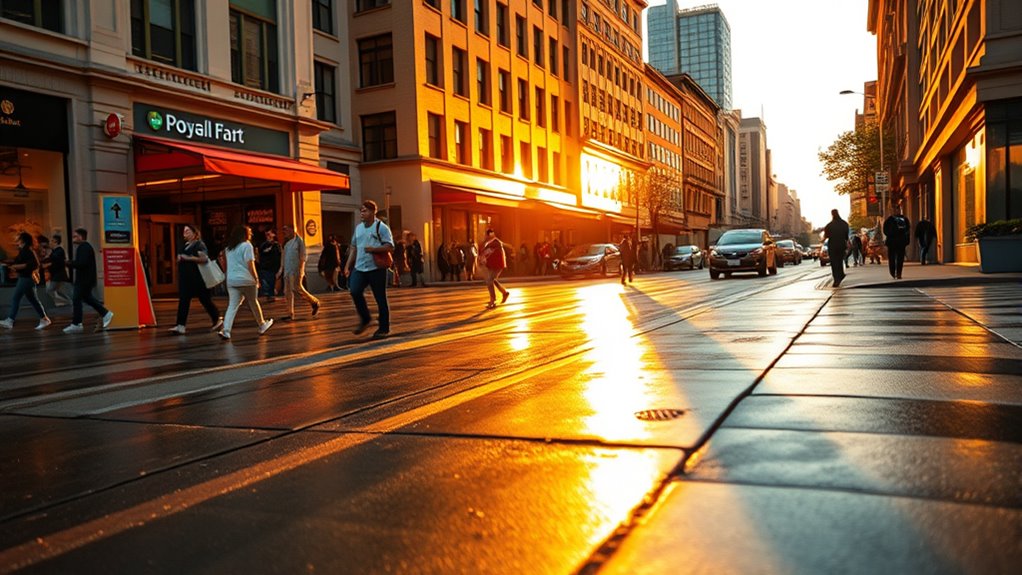
In today’s world, smartphone photography has become an accessible and powerful tool for capturing life’s moments. Whether you’re snapping a quick selfie or trying to create a stunning landscape shot, understanding some basic principles can elevate your photos from ordinary to professional-looking. One of the most important areas to focus on is lighting. Good lighting can make or break your image, so it’s essential to learn lighting techniques that suit different situations. Natural light is your best friend—try shooting during the golden hour just after sunrise or before sunset when the sunlight is soft and warm. Avoid harsh midday sun that can create unflattering shadows and washed-out highlights. If you’re indoors, position your subject near a window to take advantage of diffused natural light. When natural light isn’t available, consider using your phone’s built-in flash sparingly, or better yet, invest in portable LED lights or reflectors to bounce light into shadowed areas. These tools help create even, flattering illumination and add depth to your photos.
Alongside lighting, mastering composition tips can significantly improve your shots. The rule of thirds is a simple yet powerful guideline—imagine dividing your frame into nine equal parts with two horizontal and two vertical lines. Position your main subject along these lines or at their intersections to create balanced, engaging images. Be mindful of your background; cluttered or distracting backgrounds can detract from your subject. Instead, aim for clean, simple backgrounds that emphasize your main focus. Leading lines, such as roads or fences, can guide the viewer’s eye directly to your subject, adding a sense of depth and perspective. Framing your subject with natural elements like trees or archways helps draw attention and creates a more compelling composition. Experiment with different angles—shoot from above, below, or at eye level—to add variety and interest. Remember, sometimes breaking the rules can produce captivating results, so don’t be afraid to try unconventional approaches. Additionally, understanding color accuracy in your shots can help you capture more realistic and vibrant images, especially when editing or sharing your photos.
Practicing these lighting techniques and composition tips will help you develop an eye for great photography. Keep experimenting with different settings, angles, and lighting conditions to discover what works best for you. Smartphone cameras are incredibly versatile, and with a little knowledge and creativity, you can produce images that rival those taken with professional gear. The key is to stay curious, practice regularly, and pay attention to how light and composition influence your photos. Over time, you’ll find yourself capturing moments with clarity, artistry, and impact—all with just your phone in hand.

2-Pack LED Video Light Kit, NiceVeedi Studio Light, 2800-6500K Dimmable Photography Lighting Kit with Tripod Stand&Phone Holder, 73" Stream Light for Video Recording, Game Streaming, YouTube
- Multiple Color Temperatures: 2800K, 4800K, 6500K options
- Adjustable Brightness: 10% to 100% control
- High CRI 97+: Accurate color rendering
As an affiliate, we earn on qualifying purchases.
As an affiliate, we earn on qualifying purchases.
Frequently Asked Questions
How Can I Improve Low-Light Photos With My Smartphone?
To improve low-light photos on your smartphone, start by using night mode settings to maximize light capture. Keep your phone steady with tripod techniques or stabilize it against a solid surface to prevent blur. Increase exposure time if possible, and avoid digital zoom. Experiment with different angles and lighting conditions, and consider using third-party apps for enhanced control. These tips will help you achieve clearer, brighter low-light shots.
What Are the Best Editing Apps for Smartphone Photos?
You should try apps like Lightroom, Snapseed, or VSCO for editing your smartphone photos. They offer powerful tools for adjusting brightness, contrast, and color. Explore filter apps like Instagram or Afterlight to add creative effects. If you want to showcase multiple images, collage tools like Canva or PicCollage are perfect. These apps help you enhance, customize, and display your photos professionally, making your images stand out effortlessly.
How Do I Stabilize My Phone for Sharper Images?
You might think that sharp photos just happen, but stabilizing your phone makes all the difference. Try tripod mounting for steady shots, especially in low light or for long exposures. If you don’t have a tripod, use hand stabilization techniques—brace your arms against your body or a stable surface. Keep your hands steady, breathe slowly, and press the shutter gently to avoid camera shake. These tips can dramatically improve your photo sharpness.
What Are the Latest Smartphone Camera Features to Look For?
You should look for smartphones with sensor improvements and advanced zoom capabilities. Modern phones often feature larger sensors that capture more light, resulting in clearer, more detailed photos. Additionally, check for optical zoom options that let you get closer without losing quality. Some models also include macro and ultra-wide lenses, giving you versatile options for various shooting scenarios. These features help you take professional-looking photos right from your phone.
How Can I Professionally Edit My Smartphone Photos?
Think of editing as your photo’s magic wand. You can enhance your images by applying color correction to brighten or add vibrancy, making your photos pop. Use cropping techniques to focus on the main subject and remove distractions. To get professional results, try editing apps like Lightroom or Snapseed. Adjust brightness, contrast, and sharpness, then save your masterpiece. With practice, your smartphone photos will look like they belong in a gallery.

Weseecase Mirror Reflection Camera Clip Kit for Smartphone, Adjustable Selfie Reflector, 2025 Model (White)
- Versatile Smartphone Mirror Clip: Attaches for creative selfies
- Adjustable Positioning: Flexible angles for perfect reflections
- Enhances Photos: Creates mirror effects without editing
As an affiliate, we earn on qualifying purchases.
As an affiliate, we earn on qualifying purchases.
Conclusion
Remember, with a little practice and creativity, your phone can capture stunning, professional-looking photos. Don’t believe the myth that only expensive cameras produce great images—smartphones today are powerful tools in the right hands. Think of it like a camera in your pocket, waiting to be explored. So go ahead, experiment and trust your eye. Sometimes, the simplest tools, when used wisely, can reveal the most extraordinary moments.

XINBAOHONG Selfie Ring Light Rechargeable Portable Clip-on Selfie Fill Light with 40 LED for Smart Phone Photography, Camera Video, Girl
- Ring Selfie Light Design: Evenly diffused LED fill light
- Lighting Modes: Three adjustable white brightness levels
- Rechargeable Power: Built-in rechargeable battery with USB
As an affiliate, we earn on qualifying purchases.
As an affiliate, we earn on qualifying purchases.

Fiabtool 2Pcs LED Sunset Filter Track Light, Dimmable Aluminum Spotlight
- Track Compatibility: Compatible with J&L type tracks only
- Lighting Effect: Replicates natural sunset glow
- Projection Style: Projects gradient, vintage filter-like light
As an affiliate, we earn on qualifying purchases.
As an affiliate, we earn on qualifying purchases.