
TL;DR
Placing your high-power rig in a closet and applying targeted acoustic dampening drastically reduces noise. Proper ventilation is key to preventing overheating and maintaining performance. This approach can transform a loud setup into a silent, productive space.
If your workspace sounds like a jet engine every time your AI rig kicks in, you’re not alone. Many enthusiasts face the challenge of noise while craving a clean, clutter-free setup. But here’s the secret: the most effective way to quiet your rig isn’t just adding foam — it’s about where and how you place it.
This article shows you how to use strategic placement, especially the ‘rig in the closet’ trick, combined with smart acoustic dampening. You’ll learn practical steps to keep your workspace silent, cool, and efficient — no fancy soundproof studio needed.
Acoustic dampening
& the rig in the closet.
The most powerful noise fix isn’t a material — it’s a floor plan. A rig you can’t hear because it’s in another room beats any amount of foam. Tap the approaches in Part 1 to see what actually works.
(another room)
(levers 1–4)
(door / barrier)
(acoustic foam)
Contain the noise, not the heat
Key Takeaways
- Placing your rig in a closet or separate room can nearly eliminate noise from your workspace.
- Ventilation is critical — trapping heat can damage hardware and cause performance drops.
- Use a combination of sound-absorbing materials, barriers, and vibration dampening for best results.
- A wired network connection and proper airflow make the 'rig in the closet' strategy practical.
- Monitor temperatures constantly to prevent overheating and ensure longevity.

Focusound 52 Pack Acoustic Foam Panels 1" x 12" x 12" Sound Proof Foam Panles Soundproofing Noise Cancelling Wedge Panels for Home Office Recoding Studio with 300PCS Double-Side Adhesive
- Soundproofing Design: Triangular grooves for noise absorption
- Includes Adhesive: 300pcs double-sided adhesive tape
- Easy Installation: Strong, removable wall adhesive
As an affiliate, we earn on qualifying purchases.
As an affiliate, we earn on qualifying purchases.
What is Acoustic Dampening, and Why Bother?
Acoustic dampening is about reducing the echoes, vibrations, and unwanted noise bouncing around your room. Think of it as softening the sound so it doesn’t reverberate or leak out. For your rig, this means fewer echoes and less noise escaping into the room or bothering neighbors.
But why does this matter? Without proper dampening, your space can become a cacophony of reverb and resonance, which not only makes your environment less pleasant but can also affect audio clarity and concentration. Dampening materials like foam or blankets absorb specific sound frequencies, preventing them from bouncing back and amplifying. However, they are most effective within the room, not as sound barriers through walls, which means placement and coverage are critical. The tradeoff is that overusing dampening can make a space feel muffled or dead, so balance is key to maintaining a natural sound environment while reducing disruptive noise.
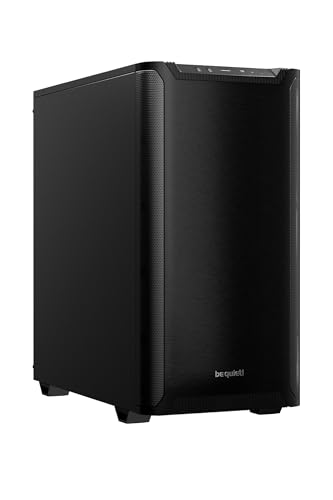
be quiet! Pure Base 501 Black ATX Case | 2 Preinstalled Pure Wings 3 140mm PWM Fans | Optimized Air Pressure | Compact PC Case | Vertical GPU Installation | USB 3.2 Gen. 2 Type C | BG073
- Minimalist Design: Clean, distraction-free appearance
- Optimized Airflow: Includes two PWM 140mm fans
- Quiet Operation: Reduces turbulence and noise
As an affiliate, we earn on qualifying purchases.
As an affiliate, we earn on qualifying purchases.
How to Use Placement and the 'Rig in the Closet' Trick to Silence Your Setup
The most straightforward way to cut down noise is to physically distance your rig from your main workspace. Placing your hardware inside a closet or spare room significantly reduces direct sound transmission, often making the noise virtually inaudible from your working position. This approach works because sound intensity diminishes with distance, and enclosing the rig helps contain the noise within a confined space. You can learn more about acoustic dampening and placement techniques.
For example, a content creator I know installed her GPU rig into a closet on the other side of her house. By doing so, she eliminated nearly all audible noise from her workspace, allowing her to work or record without background hums. This method is especially beneficial if your environment allows for such separation without compromising workflow.
Key tips for effective implementation include: Acoustic dampening, placement, and the 'rig in the closet' setup are essential considerations.
- Use a wired connection, like Ethernet, to avoid latency issues introduced by Wi-Fi, ensuring remote control and data transfer remain stable.
- Ensure proper ventilation—without it, heat will build up, risking hardware failure.
- Seal or line the closet with sound-absorbing materials to further dampen residual noise escaping through gaps or vents.
rig in closet soundproof enclosure
As an affiliate, we earn on qualifying purchases.
As an affiliate, we earn on qualifying purchases.
The One Caveat: Ventilation and Heat Management
Placing your rig in a closet sounds perfect, but there's a critical tradeoff: heat. Enclosing hardware in a sealed space traps heat, which can cause components to throttle performance or even sustain damage over time. For example, a GPU running at 85°C in a closed closet isn’t sustainable long-term, as thermal stress accelerates wear and reduces efficiency.
To counteract this, active ventilation becomes essential. Think of it as giving your computer lungs—small exhaust fans, passive vents, or ducted airflow channels help remove hot air and bring in cooler air from outside. For more on ventilation strategies, see ventilation and heat management tips. Without proper airflow, your hardware risks overheating, which leads to thermal throttling—where the GPU or CPU reduces its speed to prevent damage—thus negating the noise reduction benefits of the closet setup. Additionally, heat accumulation can cause long-term damage, shortening hardware lifespan and increasing maintenance costs. Therefore, designing a ventilation system that balances noise, airflow, and temperature regulation is vital to maintaining both silence and hardware health.

Tecmojo 6U Wall Mount Server Cabinet IT Network Rack Enclosure Lockable Door and Side Panels Black, Cooling Fan, Standard Glass Door, 450mm Depth, for 19” IT Equipment, A/V Devices
- Space-Saving Wall Mount Design: 6U cabinet with compact dimensions
- Secure Lockable Doors: Glass door and side panels for security
- Flexible Door Orientation: Reversible front door for swing preference
As an affiliate, we earn on qualifying purchases.
As an affiliate, we earn on qualifying purchases.
Comparing Noise Blockers: Foam, Barriers, and Vibration Control
| Method | What It Does | Limitations |
|---|---|---|
| Acoustic Foam | Absorbs sound reflections and echoes inside a room, reducing reverberation and creating a more controlled acoustic environment. | While effective at controlling internal reflections, foam panels do not block sound transmission through walls or floors, so noise can still escape if not combined with barriers. |
| Solid Barriers | Act as physical walls that block airborne noise from passing through walls or doors, preventing sound leakage into adjacent spaces. | Heavy, often costly, and require proper sealing to be effective. They also can reflect sound, which may need additional damping inside the barrier. You might find useful insights on soundproofing barriers and dampening helpful. |
| Vibration Dampening | Reduces structure-borne noise transmitted through surfaces like desks, shelves, or mounts, preventing vibrations from turning into audible hums or rattles. | Often overlooked, but crucial for low-frequency hums. If neglected, vibrations can amplify noise and transfer sound to other parts of the structure, undermining overall silence efforts. |
Frequently Asked Questions
Is putting my AI rig in a closet a good idea?
Yes, if you ensure proper ventilation. It isolates noise effectively, especially when combined with acoustic dampening. Just be mindful of heat buildup and airflow.What materials work best for acoustic dampening in small spaces?
High-density foam panels, bass traps, and acoustic blankets are top choices. DIY options include thick blankets and curtains, which can also help absorb reflections.How do I prevent my equipment from overheating in a closet?
Install quiet, thermostatically controlled exhaust fans or passive vents. Regularly monitor temperatures during heavy workloads to avoid thermal issues. For more detailed advice, visit ourmindandbody.com for holistic health tips that include equipment maintenance. throttling or damage.Where should I place acoustic panels for maximum effect?
Focus on reflection points like walls opposite speakers, corners (for bass trapping), and ceiling areas. Use a mirror trick to find reflection spots easily.Can I DIY my acoustic treatment and ventilation?
Absolutely. Many effective solutions involve affordable materials and simple installations. Plenty of online tutorials can guide you through the process.Conclusion
Moving your rig into a closet with smart acoustic treatment turns a noisy, distracting machine into a silent partner in your workflow. The key is balancing soundproofing with ventilation — otherwise, heat will undo all your efforts.
Think of your setup like a high-performance car: sealed, soundproof, but with a well-designed cooling system. That combo keeps everything running smoothly, quietly, and cool.