

If you’ve accidentally deleted files from your Windows or Mac computer, act quickly to maximize your chances of recovery. Don’t overwrite the deleted data by saving new files and use recovery tools like Recuva or Disk Drill to scan your drive for remnants of lost files. Check your Recycle Bin or Trash first, and consider restoring from backups if available. Continue exploring for detailed steps to help you recover your important data efficiently.
Key Takeaways
- Check the Recycle Bin (Windows) or Trash (Mac) for recently deleted files and restore if available.
- Use file recovery software like Recuva or Disk Drill promptly to scan and recover deleted data.
- Avoid saving new files to the same drive to prevent overwriting recoverable data.
- Restore files from backups via cloud services or external drives if available.
- Act quickly, as the chances of recovery decrease once new data overwrites the deleted files.

Have you ever accidentally deleted an important file and wondered if it’s still recoverable? It’s a common situation, but don’t panic. The good news is that in many cases, you can retrieve lost files using effective file recovery tools and by relying on your backup strategies. The key is acting quickly before the data gets overwritten or becomes unrecoverable.
First, understand that when you delete a file, it typically isn’t completely erased from your storage device right away. Instead, the space it occupies is marked as available for new data. As long as new files haven’t overwritten that space, there’s a good chance to recover your deleted file. This is where file recovery tools come into play. These specialized programs scan your storage device, searching for remnants of deleted files that haven’t been overwritten. Many of these tools are user-friendly, offering simple interfaces that guide you through the recovery process. Popular options include Recuva for Windows and Disk Drill for Mac. Just remember, the faster you run these tools after deletion, the higher your chances of success.
Deleted files aren’t gone until overwritten; act quickly with recovery tools like Recuva or Disk Drill.
In addition to recovery software, having a solid backup strategy is your best defense against data loss. Regularly backing up your files ensures you won’t be left empty-handed if accidental deletion happens. Cloud services like Google Drive or Dropbox make it easy to keep recent copies of your important files accessible from anywhere. External hard drives and USB drives are also reliable options for creating manual backups. By maintaining consistent backups, you can simply restore your files from a saved version, sidestepping the need for recovery tools altogether.
When attempting to recover a deleted file, avoid saving new data onto the same drive. Doing so increases the risk of overwriting the files you want to recover. Instead, use a different storage device or partition for recovery efforts. If you’re on Windows, you can also check the Recycle Bin—it’s often the first place to look if you’ve just deleted a file. On Mac, check the Trash Bin, or if you have Time Machine backups, you can retrieve deleted files from there. Additionally, understanding the importance of contrast ratio can help you optimize your home cinema setup for better image quality if you’re working with projectors.
Ultimately, the combination of effective file recovery tools and good backup strategies provides a safety net. Acting swiftly and carefully makes all the difference. Keep your backup plans updated and familiarized with recovery options, so when accidents happen, you’re prepared to restore your valuable data efficiently.

Data Recovery software compatible with Windows 11, 10, 8.1, 7 – recover deleted and lost files – rescue deleted images, photos, audios, videos, documents and more
- Compatibility: Works with Windows 11, 10, 8.1, 7
- File Recovery: Recovers deleted and lost files
- Supported Files: Restores documents, images, videos, audios, emails
As an affiliate, we earn on qualifying purchases.
As an affiliate, we earn on qualifying purchases.
Frequently Asked Questions
Can Permanently Deleted Files Be Recovered After Emptying the Recycle Bin?
Yes, you can recover permanently deleted files after emptying the recycle bin, but it’s tricky. You need to act quickly and use file recovery software that scans for data remnants before they’re overwritten. Keep in mind, the longer you wait, the higher the chance that new data overwriting the deleted files will make recovery impossible. So, stop using the drive immediately and try recovery tools as soon as possible.
How Long Do Deleted Files Stay Recoverable on Windows and Mac?
Deleted files on Windows and Mac typically stay recoverable within the file retention or recovery window, which can range from a few days to several weeks, depending on your system settings and storage activity. Once this window expires, the chances of successful recovery drop considerably as new data overwrites the deleted files. To maximize your chances, act quickly and avoid saving new files to the same drive.
Are There Risks of Data Corruption During the Recovery Process?
Yes, there are risks of data corruption during recovery, which can affect file integrity. If you don’t use reliable recovery tools or interrupt the process, it might compromise the recovery success. To minimize these risks, guarantee you choose reputable software, avoid overwriting data, and follow instructions carefully. This way, you improve your chances of recovering files intact without risking corruption or loss of important information.
Is It Possible to Recover Files From Corrupted or Damaged Drives?
Did you know that about 20% of hard drives experience some form of corruption? Yes, it’s often possible to recover files from corrupted or damaged drives using specialized data recovery techniques. First, stop using the drive to prevent further damage. Then, try tools like data recovery software or professional services. These methods can often retrieve your files even when drive corruption seems severe, giving you a chance to restore lost data.
Do Free Recovery Tools Guarantee Complete File Recovery?
Free recovery tools don’t guarantee complete file recovery, as recovery success depends on factors like file damage and drive condition. While they’re useful for quick, simple restores, you might not retrieve every file or its original quality. Use free tools to assess your chances first, but for critical or complex recovery, consider paid options or professional services to maximize your chances of full, successful restoration.
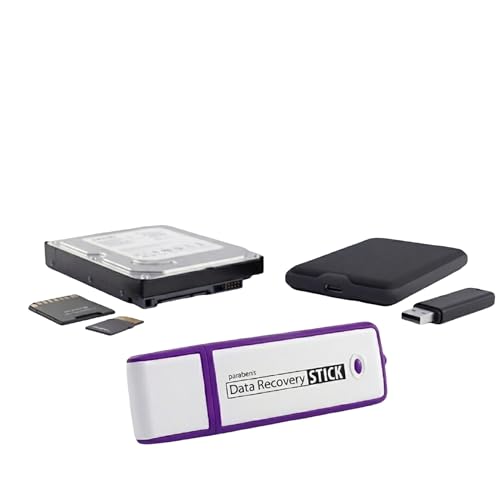
Data Recovery Stick for Windows Data Recovery Software – Photos, Files
- Easy to Use: Plug and recover files automatically
- Wide Compatibility: Supports Windows Vista to 11
- File Type Support: Recovers photos, documents, music, PDFs, and more
As an affiliate, we earn on qualifying purchases.
As an affiliate, we earn on qualifying purchases.
Conclusion
Just like Pandora’s box, once files are gone, it may seem lost forever. But with these steps, you hold the key to reopening your digital treasure chest. Remember, backups are your shield, and recovery tools are your guiding stars. Don’t let despair be your final chapter—act quickly, stay calm, and reclaim what’s yours. Because in the end, every deleted file is a puzzle waiting to be solved, and you hold the missing piece.

Seagate Portable 5TB External Hard Drive HDD – USB 3.0 for PC, Mac, PS4, & Xbox – 1-Year Rescue Service (STGX5000400), Black
- Storage Capacity: 5TB portable external hard drive
- Compatibility: Works with Windows and Mac
- Easy Backup: Drag-and-drop backup feature
As an affiliate, we earn on qualifying purchases.
As an affiliate, we earn on qualifying purchases.
USB flash drive for data recovery
As an affiliate, we earn on qualifying purchases.
As an affiliate, we earn on qualifying purchases.