
TL;DR
Open a free Amazon Business account
Business pricing, bulk buying and tax-exempt orders.
Create a free accountAs an affiliate, we earn on qualifying purchases.
Building your own AI workstation used to be cheaper, but recent shortages and price spikes have closed that gap. Now, the decision hinges on control, support, and how much time you’re willing to invest. Both options have pros and cons that matter more than ever.
Imagine launching a powerful AI project, only to find your shiny new build costs more than a ready-made system. Surprising? Not anymore. The lines between build and buy are blurring because of rising component costs, supply chain hiccups, and a booming AI market. Today, choosing isn’t just about saving money; it’s about control, speed, and long-term support. Whether you’re a hobbyist, startup, or enterprise, understanding what each path offers can save you time, headaches, and cash.
In this guide, you’ll learn how the current market reshapes the build vs buy debate, what factors truly matter for AI workloads, and which choice aligns with your goals—whether that’s maximum customization or quick deployment. You can also explore building a dedicated AI workstation for optimal performance.
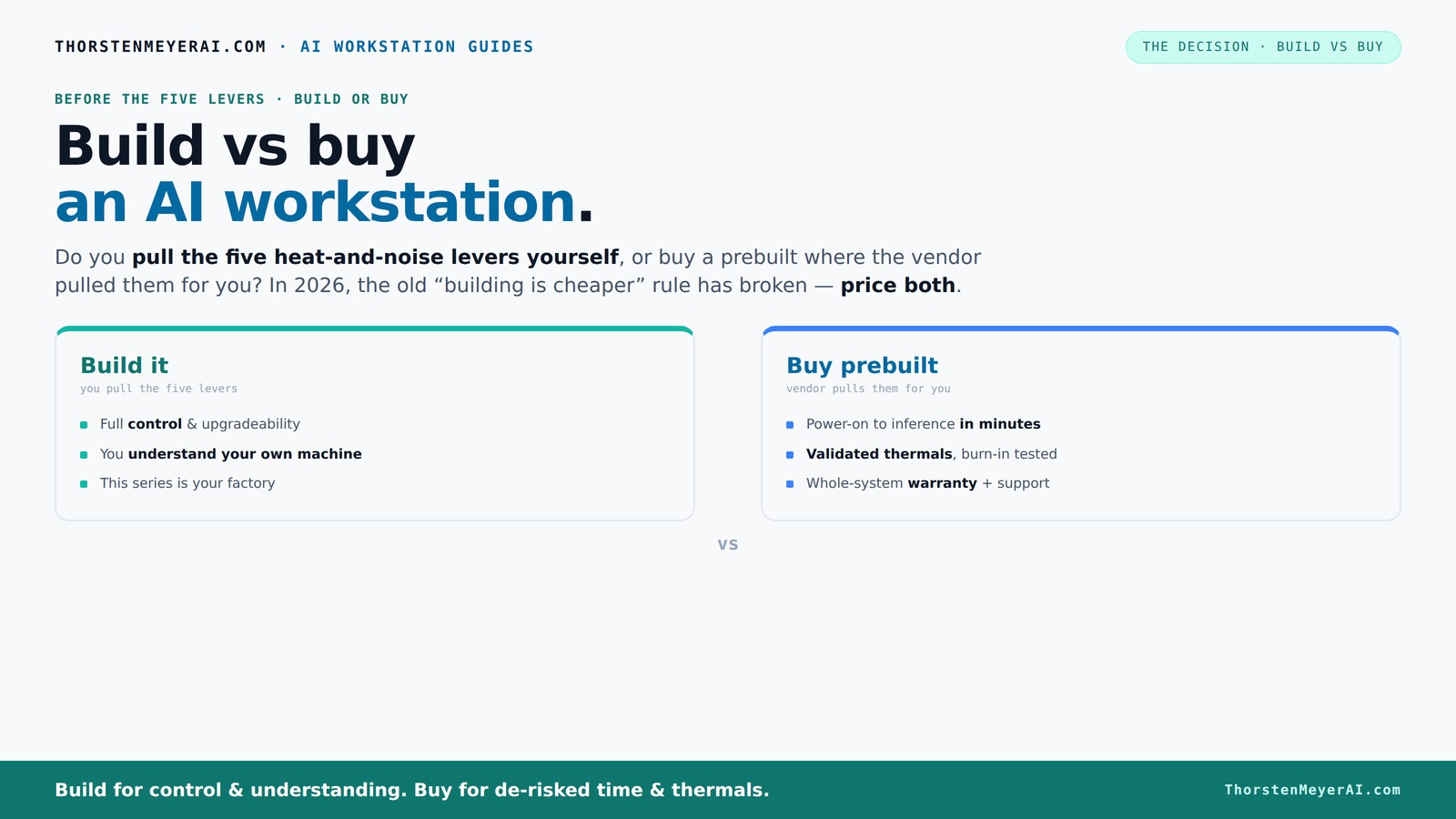
Build vs buy
an AI workstation.
The real question behind this whole series: do you pull the five heat-and-noise levers yourself, or buy a prebuilt where the vendor pulled them for you? And in 2026, the old “building is cheaper” rule has broken. Match your situation in Part 3.
Key Takeaways
- Component shortages and price hikes mean prebuilt AI workstations can cost as much or less than DIY builds today.
- Thermal management and noise control are critical for AI workloads; prebuilt systems often validate these for you.
- Support, warranty, and reliability are major advantages of prebuilt options, especially for production environments. Learn more about building vs buying AI workstations.
- DIY builds offer unmatched control and upgradeability but require time, technical skill, and troubleshooting effort.
- Market trends are shifting toward turnkey AI solutions, making quick deployment more attractive than ever.
high performance AI workstation prebuilt
As an affiliate, we earn on qualifying purchases.
As an affiliate, we earn on qualifying purchases.
Why Building Your AI Workstation Is No Longer the Cheapest Choice
Building a custom AI workstation used to be the clear winner on price. But in 2026, supply chain shortages and component price spikes have flipped the script. DDR5 RAM, high-end GPUs, and SSDs now cost 15-30% more than in 2024. A build that once cost $1,000 can now climb over $1,250 before you even add an OS.
Meanwhile, big vendors preemptively bought parts in bulk, locking in lower prices. Some prebuilt systems now match or even beat DIY costs—especially when you factor in the time, troubleshooting, and compatibility checks you’d otherwise do yourself.
For example, a top-tier GPU like the NVIDIA RTX 4090, which used to retail for $1,600, now often sells for $1,900–$2,100 due to shortages. A prebuilt with that GPU, tested and validated for thermals and noise, might cost around the same or less than assembling it yourself today.
Why does this matter? Because the historical cost advantage of DIY builds was often justified by the ability to fine-tune components for maximum performance at minimal expense. Now, with prices inflated and prebuilt systems optimized for thermals and noise, the financial gap narrows or even reverses. This shift means that for many users, the decision should be based more on convenience and reliability than purely on cost savings.
customizable AI GPU workstation build
As an affiliate, we earn on qualifying purchases.
As an affiliate, we earn on qualifying purchases.
Control or Convenience? How the Levers of Heat and Noise Decide Your Path
Building or buying isn’t just about parts—it's about how you manage heat, noise, and thermal throttling. A high-end AI system runs hot and loud during long training runs. The question: do you pull those levers yourself, or does the vendor?
Buy a prebuilt → the vendor tunes the fans, validates thermals, and often includes water-cooling for quieter, cooler operation. They run the system through stress tests, so you get a machine ready for heavy workloads. This validation process is crucial because thermal efficiency directly impacts performance; overheating can cause throttling, which reduces training speed and efficiency. Noise levels also matter: a quieter system means less distraction and better working conditions, especially in shared spaces or offices.
Build your own → you choose the cooling, fan curves, and airflow setup. Want a whisper-quiet rig? You’ll spend time selecting low-noise GPUs, case fans, and undervolting components. It’s a learning process, but you get exactly the noise profile you want. This control allows for tailored thermal management, which can optimize performance and hardware longevity. For tips on optimizing your setup, visit wellnessnap.com. However, it requires deep knowledge and time investment. Poor thermal design or inadequate cooling can lead to thermal throttling, reducing GPU performance during extended workloads. Conversely, overly aggressive cooling can increase noise, negating the benefits of a quiet setup. The tradeoff is between effort and precision—deciding whether you’re willing to invest the time to optimize thermals or prefer a plug-and-play solution that’s already tested and balanced.
For example, Lambda’s custom systems are tested under 48 hours of sustained load, ensuring no thermal throttling or noise spikes. That’s built-in quality you pay for, not something you’d get from a generic DIY build. The implication? Proper thermal management isn’t just about comfort; it directly affects the consistency and efficiency of AI training, which can have significant cost and time implications.
professional AI workstation with support
As an affiliate, we earn on qualifying purchases.
As an affiliate, we earn on qualifying purchases.
When Buying a Prebuilt Works Better Than Building
If immediate deployment, proven thermals, and support matter, a prebuilt often wins. Consider reading about prebuilt AI workstations for quick setup. Imagine launching a training pipeline on day one—no BIOS tweaks, no driver issues, just plug in and go. Vendors like BIZON and Puget perform rigorous testing, ensuring your system won’t throttle under stress. This reliability is critical for production environments where downtime or performance dips can be costly, both financially and in terms of project timelines.
Plus, support is a big plus. When a GPU fan dies or the system crashes during a long run, a single support call solves it. Many prebuilt vendors offer warranties up to 5 years, covering parts and labor, reducing downtime and headaches. This support network is especially valuable when your AI workloads are mission-critical or when you lack the in-house expertise to troubleshoot complex hardware issues quickly.
For example, a multi-GPU system from Lambda is validated for power and cooling, with expert support standing behind it. That’s a safety net that DIY can’t match, especially for mission-critical AI work. The key takeaway? Prebuilt systems reduce the risk of compatibility issues, thermal failures, and hardware downtime, making them ideal for those who prioritize stability and quick deployment over customization.
prebuilt AI server for deep learning
As an affiliate, we earn on qualifying purchases.
As an affiliate, we earn on qualifying purchases.
When Building Your Own AI Workstation Makes Sense
If you love tinkering, want maximum flexibility, or have a tight budget, building your own AI machine is still attractive. You select every component—quiet GPUs, a low-noise CPU cooler, a case with sound-dampening panels—tailored for your workload. This approach allows you to optimize each element for your specific needs, potentially reducing costs and improving performance in the long run.
Say you’re training small models but need a machine that you can upgrade later. DIY lets you swap out GPUs, add more RAM, or replace storage without proprietary connectors or vendor lock-in. This flexibility is crucial for evolving workloads or for users who want to extend the lifespan of their investment. Additionally, a custom build can be more energy-efficient if you select components carefully, reducing operational costs over time.
For example, choosing a quiet GPU and undervolting it can cut noise levels by 30%, making long training sessions more bearable. You also gain full control over the thermal profile, which can extend hardware lifespan and reduce energy use. The tradeoff? It requires technical knowledge and time, but for those willing to invest, the payoff is a machine precisely tuned to their preferences, often with better upgrade paths and cost control.
Compare the Key Factors: Build vs Buy in a Nutshell
| Aspect | Build Your Own | Buy Prebuilt |
|---|---|---|
| Cost | Lower on parts, but time-consuming; can be cheaper if you have skills | Often comparable or cheaper due to bulk buying; includes support |
| Time & Effort | High—assembly, troubleshooting, tuning | Minimal—plug and play |
| Performance Tuning | Full control—custom cooling, undervolting, airflow | Factory-optimized—validated thermals and noise |
| Support & Warranty | Component-level, owner’s responsibility | Single point, full warranty, support included |
| Upgradeability | Easy—standard parts, open design | Varies—may use proprietary parts |
Recent Trends: AI-Optimized Systems and Market Shifts
AI-optimized prebuilt systems are becoming more common. Dell and ASUS now offer configurations specifically tailored for AI workloads, with ISV software optimizations, lower latency, and better power efficiency. These are designed for quick deployment, especially for startups and small teams.
At the same time, local AI workloads are pushing hardware choices beyond gaming PC logic. High VRAM, fast memory bandwidth, and NPU acceleration are increasingly important. A prebuilt can incorporate these features seamlessly, while DIY builders must source and validate each component. This shift means that the complexity of building a high-performance AI workstation is rising, making prebuilt solutions more attractive for those who want a hassle-free experience without compromising on cutting-edge features.
According to [1], these trends mean that for many users, the line between build and buy is blurring—especially when time-to-productivity counts.
Frequently Asked Questions
Is it cheaper to build or buy an AI workstation in 2026?
These days, the cost difference is less clear. Supply chain issues have increased component prices, making prebuilt systems often comparable in price or even cheaper when considering time and troubleshooting costs. Always compare your specific configuration on both sides.Which option provides better performance for training models?
Both can deliver high performance, but a prebuilt optimized for AI workloads often includes validated thermals and cooling, ensuring sustained GPU performance. Custom builds can match that, but require careful selection and tuning. The key is that prebuilt systems frequently undergo rigorous validation, reducing the risk of thermal throttling that can limit performance during prolonged training sessions.How much VRAM do I need for local AI models?
It depends on your workload. For training large models or handling big datasets, 24GB–48GB VRAM is common. For inference or smaller models, 8GB–16GB might suffice. The implication is that choosing the right VRAM capacity is critical to avoid bottlenecks, and prebuilt systems often come with configurations optimized for these needs, saving you time in sourcing and validation.Can I upgrade a prebuilt system later?
It varies. Some prebuilt systems use standard parts, making upgrades simple and cost-effective. Others may have proprietary connectors or layouts, which can limit future upgrade options. Understanding the manufacturer's upgrade policy is essential because it influences the longevity and flexibility of your investment—an important consideration for evolving AI workloads.Is support quality better on prebuilt systems?
Yes. Prebuilts generally come with comprehensive warranties and dedicated support, reducing downtime when issues arise. DIY builds rely on component warranties and self-troubleshooting, which can prolong resolution times. The support infrastructure of prebuilt vendors often includes proactive diagnostics and quick replacement parts, making them more reliable for critical AI tasks.Conclusion
Choosing between build and buy in 2026 isn’t just a question of saving money. It’s about what you value most—control, support, speed, or customization. For most, a well-chosen prebuilt offers a reliable, ready-to-go solution that minimizes risk and maximizes uptime.
But if you love tinkering and want a machine perfectly tailored to your needs, building remains a rewarding challenge. Either way, remember: the real power lies in matching your choice to your workload and your goals. Now, go make that AI project happen—your machine is waiting.
Fall Picks
fall essentials
As an affiliate, we earn on qualifying purchases.